
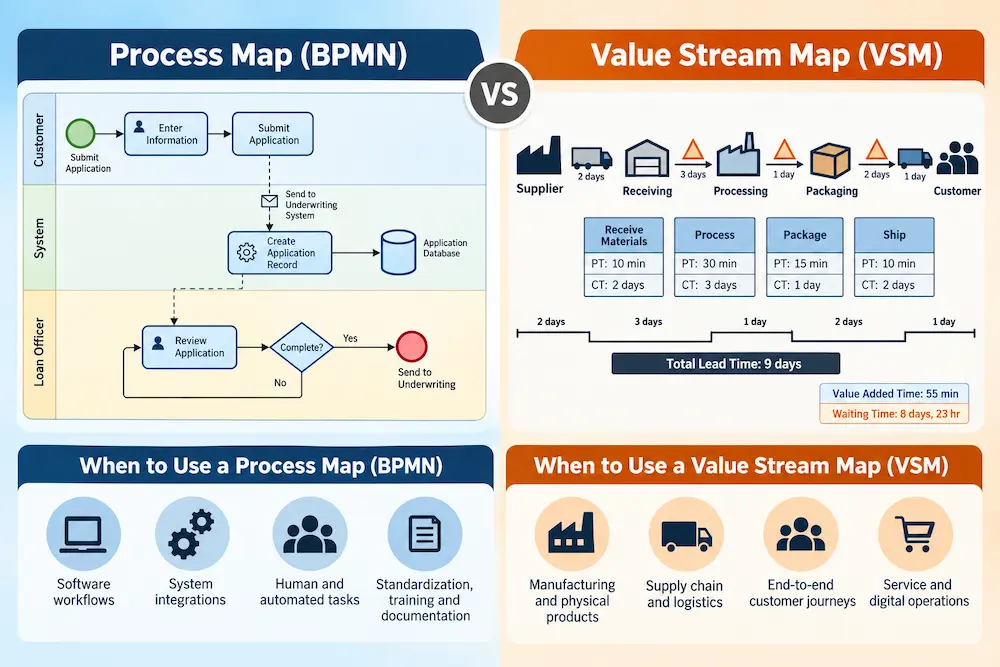
The owner of a small mortgage brokerage is genuinely proud of the process map her loan officers use. It's thorough: every decision point in reviewing an application, every branch for different loan types, every required document, laid out cleanly enough that a new hire can follow it without hand-holding after a week of training. Every loan officer on the team follows it, closely.
And customers are still waiting three weeks for a loan the brokerage advertises as a ten-business-day process. Nobody on the team can explain the gap. The process map, the actual documented thing everyone follows, looks tight. Nothing on it takes three weeks. So where is the time actually going?
A Process Map Was Never Built to Answer That Question
Here's the blind spot, and it's an easy one to miss precisely because the process map is genuinely good at what it does: it documents the steps and decisions within one role, in this case, what happens at a loan officer's desk once a file is in front of them. It's a magnifying glass, zoomed in tightly on one part of the journey, and it has no reason to show anything about what happens before the file reaches that desk, what happens after it leaves, or how long it sits waiting in between. A process map was never designed to answer "why does this take three weeks." It was designed to answer "what exactly happens at this one step, and how do we make sure everyone does it the same way."
Those are both genuinely useful questions. They're just not the same question, and confusing them is exactly how a brokerage ends up with a beautifully documented, closely followed process that still can't explain its own timeline.
The Tool Built for the Wide Shot
A value stream map exists specifically to answer the question the process map couldn't. Instead of zooming in on one role, it follows a single unit of work, a loan file, a customer order, a patient, from the moment it enters the system all the way to the moment it's delivered, crossing every person, department, and outside vendor it touches along the way. And it deliberately tracks two different kinds of time at every single step, not just what happens, but how long each part actually takes: the time someone's hands are actively on the work, and the time it simply sits waiting for someone to get to it next.
That second kind of time is the part a process map has no way to capture, and it's usually where the real answer is hiding.
What Mapping the Whole Journey Actually Found
Tracing an actual loan file from intake to closing, rather than just the steps at the loan officer's desk, turns up something the process map could never have shown. The loan officer's own work matches the map almost exactly: roughly three hours total, spread across intake review, underwriting prep, and final sign-off. That part was never the problem.
The problem lives in what happens between steps. Once the loan officer submits the file to underwriting, it sits in a queue for four days before anyone actually opens it, not because underwriting is slow at the work itself, but because files get batched and reviewed in the order they arrived, and four days is simply how long the queue runs most weeks. Once underwriting requests an appraisal, another week passes before the appraisal even gets scheduled, mostly because requests get sent to the appraisal vendor in a daily batch rather than the moment they're needed. Add it up, and the file is being actively worked on for roughly three hours out of a three-week journey. Nearly all of the customer's wait lives in queues between handoffs that no single team's process map was ever built to show, because no single team owns the queue itself.
The Gap That's Usually the Real Discovery
That ratio, three hours of actual work inside three weeks of total elapsed time, is jarring the first time anyone actually measures it, and it's almost always the single most valuable thing a value stream map reveals. Most processes have far more waiting built into them than anyone realizes, simply because waiting is invisible until someone deliberately tracks it. A process map can make every individual step look efficient and still leave the overall journey painfully slow, because efficient steps separated by long queues still add up to a slow experience for whoever's waiting on the other end.
Using the Right Tool for the Right Question
Both tools stay genuinely useful, for different jobs. A process map is exactly the right tool when the goal is standardizing how one task or role gets performed consistently, training a new loan officer, making sure every application gets reviewed the same careful way regardless of who's handling it, or documenting a procedure that needs to be followed consistently by different people. None of that work was wasted. It's still worth having documented well.
Process maps are also useful far beyond simple manual procedures. The processes running through modern organizations often combine people, software, databases, APIs, automated decisions, and external services. A customer places an order on a website, the payment is authorized by a third-party service, the order is written to an inventory system, an API sends it to the warehouse, and a person may eventually need to resolve an exception. All of that is still a process, and it can be mapped.
The notation used to create the map can become more important as the process becomes more complex. BPMN, or Business Process Model and Notation, is a standardized notation for modeling business processes. It provides symbols for activities, events, decisions, messages, participants, and the interactions between people and systems, making it particularly useful when a process crosses organizational or technical boundaries.
That means a process map can describe something as simple as the steps a loan officer follows when reviewing an application, or something much more complex such as the interaction between a customer, an ecommerce platform, a payment provider, an inventory system, and a fulfillment team. The underlying purpose is the same: make the process visible so people can understand how it actually works.
The BPMN 2.0 SVG Icon Set is available as a free resource for creating BPMN-based process models.
A value stream map is the right tool when the actual question is why something takes as long as it does from the customer's side, or where the real opportunity for speed is hiding across a journey that crosses multiple people, departments, or outside vendors. Reaching for a process map to answer that second question, the way the brokerage had been doing without realizing it, means staring harder and harder at the one part of the system that was never actually the bottleneck.
Value stream mapping is not limited to factories or physical products either. The "thing" moving through the value stream can be almost anything: a loan application, an insurance claim, a hotel reservation, a software change, a customer support request, an invoice, or an online order. The same question still applies: where does the work move, where does it wait, and where are the handoffs that extend the customer's total lead time?
That makes value stream mapping particularly useful in modern service and digital operations. A software process might move from a customer request to a ticketing system, then through analysis, development, code review, automated testing, security approval, deployment, and finally the customer. Some of those steps happen automatically. Others require people. The value stream still exists, and the waiting between those steps can still dominate the total elapsed time.
The same principle applies to a hotel reservation, for example. A booking might move from the website to the reservation system, through payment authorization, confirmation messaging, inventory updates, and eventually the property's front desk. If a customer has to wait for a manual intervention somewhere in that chain, the fact that most of the surrounding steps are automated doesn't make the waiting any less real.
Lean 6 Sigma Factory also provides a free Value Stream Mapping SVG Icons Pack for building custom value stream maps beyond the traditional manufacturing examples.
Two Different Views of the Same Process
The distinction becomes easier to see when the question is made explicit. A process map and a value stream map can both describe the same operation, but they are looking at it from different perspectives.
| Question | Process Map | Value Stream Map |
|---|---|---|
| What does it show? | Activities, decisions, sequence, interactions, and how a process works | End-to-end movement of work and information through a value stream |
| Primary focus | Understanding and documenting the process itself | Understanding flow, waiting, queues, handoffs, and lead time |
| Typical scope | One task, role, department, workflow, or complex cross-functional process | The complete journey of a product, service, request, or other unit of work |
| Technology | Can show people, systems, automation, interfaces, decisions, and system interactions | Can include information systems and information flow as part of the overall value stream |
| Typical use | Standardization, training, documentation, workflow design, and process analysis | Finding waiting, queues, bottlenecks, handoff problems, and lead-time opportunities |
These are not competing versions of the same tool. A process map gives you a view of how a process works, at whatever level of detail the question requires. BPMN can provide a standardized language for modeling a complex process, particularly when people and technology interact. A value stream map answers a different question: how does the work move through the entire value stream, and where does it spend time waiting rather than being actively worked?
Process Mapping Applies to the Customer Journey Too
This distinction also matters when the process is something the customer experiences directly. A customer journey can contain dozens of individual processes that span departments, software platforms, automated services, and human interactions. Mapping those interactions can reveal problems that are almost impossible to see when each department only looks at its own part.
Consider a hotel guest making a reservation. The customer searches for a room, selects dates, enters their details, submits payment, receives confirmation, arrives at the property, checks in, receives their room assignment, and eventually checks out. Behind those visible steps are reservation systems, payment processing, inventory updates, confirmation messages, housekeeping information, front-desk activity, and potentially manual intervention when something doesn't match.
A process map can make the sequence and decisions visible. It can show where an employee acts, where a system acts automatically, where information is transferred, and where an exception sends the process down another path. A value stream map can then step back and ask a different question: how long does the customer spend moving through the entire experience, and where does that journey slow down?
This is one reason process improvement should not be treated as something that belongs only to a factory floor. The same underlying logic applies to manufacturing, healthcare, hospitality, financial services, software development, customer support, ecommerce, administration, and virtually any organization where work moves from one point to another.
Choosing the Right Level of Detail
Building a useful process map requires more than putting boxes on a page. The level of detail needs to match the question being asked. A simple procedure may need nothing more than a sequence of activities and a few decisions. A process crossing multiple teams and systems may need participants, events, messages, exceptions, and system interactions. BPMN provides a standardized way to represent that complexity when the process calls for it.
A value stream map has its own visual language and methodology, with symbols for processes, queues, information flow, inventory or work in progress, and a timeline that makes the relationship between active work and waiting visible. Building one properly also means understanding what should be included in the value stream, collecting the right information, and validating the actual flow with the people who work in it.
Leading a group through mapping a process honestly is a skill too. The map often exposes differences between how people think a process works and how it actually works, particularly when several departments or systems are involved. The important thing is not to create the most complicated diagram possible. It's to create a useful representation of the process that answers the question you actually need to answer.
Back at the Brokerage
Once the owner saw where the three weeks were actually going, the fix had nothing to do with her loan officers working any faster; they were never the problem, and pushing them harder would have squeezed a part of the process that had almost no slack left in it anyway. The real opportunity sat in two specific queues: batching underwriting reviews daily instead of letting files sit for up to four days, and sending appraisal requests the moment they're needed instead of holding them for a daily batch. Neither fix touched the process map her team had worked hard to build and still uses today. Both fixes lived entirely in the part of the journey that map was never designed to see.
This same blind spot, a process that looks efficient step by step while the customer experiences something painfully slow, is exactly the kind of invisible friction covered in more depth in this article on the small, overlooked things companies leave broken while chasing bigger, more visible projects.
Frequently Asked Questions
1. What's the basic difference between a process map and a value stream map?
A process map documents how a process works, including its activities, decisions, sequence, and interactions. It can focus on a single task or role or describe a much more complex process involving multiple people and systems. A value stream map follows a unit of work across an entire journey, crossing multiple people, departments, or vendors, and tracks both active work time and waiting time at every step, showing why the overall journey takes as long as it does.
2. Why can a process look efficient on a process map but still take a long time overall?
Because the process itself may contain very little actual work while the overall journey contains significant waiting between steps. A process map can show that each individual activity is performed efficiently without showing the queues and delays that occur before the next activity begins. A value stream map is specifically designed to make that waiting visible.
3. What does a value stream map actually track that a process map doesn't?
A value stream map deliberately separates and tracks two distinct kinds of time at each step: how long the actual work takes when someone is actively doing it, and how long the item sits waiting before the next step begins. It also looks across the complete value stream rather than focusing only on one part of the process.
4. When should you use a process map instead of a value stream map?
When the goal is understanding, documenting, analyzing, or standardizing how a process works. This could mean training a new employee on a specific procedure, documenting a workflow, understanding decision points, analyzing interactions between people and systems, or designing how a process should operate. A process map is well suited to those jobs.
5. When should you use a value stream map instead of a process map?
When the real question is why something takes as long as it does from the customer's perspective, or where delays are hiding across a process that spans multiple people, departments, or organizations. A value stream map is built specifically to reveal the movement of work, information, waiting, queues, and handoffs across that wider journey.
6. What is BPMN and how does it relate to process mapping?
BPMN, or Business Process Model and Notation, is a standardized notation for creating process models. It provides symbols for activities, events, decisions, messages, participants, and interactions between people and systems. It is particularly useful when a process becomes complex or crosses organizational and technical boundaries. BPMN is therefore a way of representing a process map, not a separate alternative to process mapping.
7. Can process mapping be used for technical or automated processes?
Yes. Modern processes frequently combine people, software, databases, APIs, automated decisions, external services, and manual exception handling. A process map can make those interactions visible and show where work moves between a person and a system, where information is transferred, and where a human intervention is required.
8. Is value stream mapping only for manufacturing?
No. The unit of work moving through a value stream can be a physical product, loan application, insurance claim, hotel reservation, software change, customer support request, invoice, or online order. The same fundamental questions apply: where does the work move, where does it wait, and where are the handoffs that extend the total lead time?
9. Is it common for most of a process's total time to be waiting rather than actual work?
Yes, and it's usually far more common than people expect until they actually measure it. It's not unusual for the active work involved in a multi-step process to represent only a small fraction of the total elapsed time a customer experiences, with the rest sitting in queues between handoffs.